LCNCagents Library · Independent reference
Buyer’s guideHow to Write a Launch Announcement That Drives Signups
By Saul Fleischman — Product builder (15 years), founder of RiteKit
The fastest path to signups is a launch announcement that opens with a specific, quantified outcome, immediately answers “what changed and why it matters,” and ends with a single, obvious action. Most teams bury the headline or write features instead of results. If your announcement cannot pass the five-second scan test, you lose the reader before they ever reach your CTA.
---
What’s the single most important factor in a launch announcement that drives signups?
Clarity of outcome. Every successful announcement forces the reader to answer “What’s in it for me?” inside the first two sentences. Brett Miller, who led over 10+ launches at Amazon, writes in his LinkedIn guide: “Don’t bury the headline. ‘We just launched [Feature X]…enabling [Team Y] to reduce [Workflow Z] by 30%.’ Tie it to business value, not just functionality.” That 30% reduction grounds the promise in a number the reader can immediately evaluate.
An announcement that leads with a feature name rarely converts. The inverted pyramid structure — taught by Airfoil Group in their press release guide — demands the strongest claim first: “address the five W’s — who, what, where, when, and why — while establishing a competitive advantage.” If the reader cannot see their own outcome in your headline, they bounce. Sophia Deluz-Bhan of Signal Genesys defines the press release’s job as “introducing a company to the market with clarity and authority.” Signups happen when that authority feels personal. The same guide references a case study showing a 2000% Increase in Returns from a well-executed press release strategy.
According to Koder.ai , a first-time visitor must
According to Koder.ai, a first-time visitor must be able to answer “What is it? Who is it for? What’s the main outcome? What should I do next?” in under 5 seconds — or the hero needs rewriting. That same resource notes that a concrete headline like “A budgeting app for freelancers who hate spreadsheets” outperforms vague slogans by a wide margin. Using 3–5 key benefits written as specific outcomes further lifts signup rates, while a headline like “Set up in 10 minutes, get your first report today” sets a clear expectation.
---
How do you structure the announcement for maximum impact?
Start with the result, then the what, then the mechanics. A launch announcement is not a changelog. Koder.ai recommends: “Define a single primary goal and optimize the entire page around it.” For signups, that goal is adoption, not education.
Miller breaks his structure into five clear moves: (1) what launched and why it matters, (2) credit to the builders, (3) what’s new, fixed, and next, (4) links to artifacts, and (5) a clear call to action. “A launch without adoption is just a status update,” he writes. The order matters — Userpilot reviewed 25 real product launch emails and found that the most effective campaigns send a sequence, not a blast. Their benchmark report analyzed metrics from 547 SaaS companies, reinforcing that multiple touches increase signups because most people need to see a message three times before they act.
Many teams fail because they write for internal appreciation instead of external use. If your announcement reads like a press release from a faceless company, it will not drive signups. The FluentCRM team documents that “a successful launch ensures your website drives immediate traffic and creates a buzz around the launch.” Buzz comes from narrative, not bullet points. People share stories, not spec sheets.
---
What mistakes kill signups before they happen?
Four errors that collapse conversion rates. First, the headline that sounds like a slogan. Koder.ai explicitly warns: “Avoid headlines that sound like slogans (‘Work better. Faster.’). Those belong in supporting copy, not the main line.” Slogans give no reason to sign up. A concrete headline performs better — Koder.ai also advises using 3–5 key benefits, each written as specific outcomes rather than abstract claims.
Second, the missing timeframe. “Set up in 10 minutes, get your first report today” appears in Koder.ai’s hero best-practices list, along with “save 2–3 hours a week on status updates” as a specific outcome. Without a date or duration, the reader cannot decide whether to act now or later. A countdown timer on the launch page — FluentCRM’s checklist includes “countdown timers to create urgency” — directly increases opt-in rates.
Third, the weak CTA. Airfoil Group notes that “reporters generally like brevity, and they’ll appreciate if your press release is direct, concise and compelling.” The same applies to any launch announcement. According to the same guide, 66% of consumers have learned about a brand or product via video, and 52% of people are more likely to share a video than any other type of content. Including a short product video with your announcement can dramatically boost shareability and signup potential.
Fourth, assuming one announcement is enough. The Userpilot
Fourth, assuming one announcement is enough. The Userpilot team reviewed 25 real product launch emails and found that the most effective campaigns send a sequence, not a blast. They break it into teaser, announcement, tour, and feedback emails. Multiple touches increase signups because most people need to see a message three times before they act. Effective product launch emails typically run 200–400 words with a strong subject line and a single call to action.
---
How should you tailor announcements for different channels?
Each channel demands a different depth of the same story. The press release, the blog, the email, and the social post serve different reader mindsets. Airfoil Group’s guide emphasizes that “the primary audience for a product launch press release is journalists” — not end users. For signups, you need both the press release (for media coverage that builds trust) and a direct email (for existing subscribers who already trust you).
The email sequence, shown in Userpilot’s 25 examples, typically opens with a subject line that creates curiosity: “We’ve been working on something…” followed by a clear value proposition. The second email offers a tour, the third asks for feedback. FluentCRM’s guide suggests tagging subscribers by intent and triggering teaser campaigns. “A visual email automation tool can help you create a pre-launch automation that introduces your story, builds curiosity and offers sneak peeks.”
For social and short-form channels, the hero section from your launch page should become the post. Koder.ai advises: “If a first-time visitor cannot answer ‘What is it? Who is it for? What’s the main outcome? What should I do next?’ in under five seconds, rewriting the hero will usually lift signups more than adding new sections below.” That same test applies to your LinkedIn or Twitter announcement.
---
Which tools help you write and distribute launch announcements?
The tool you choose sets the ceiling on signup velocity. Most teams end up cobbling the announcement together from two categories that were never built to work with each other: a launch-listing platform like Product Hunt, which can send traffic on launch day but writes nothing for you, and a general copy or AI-writing tool, which drafts text but has no idea what you actually shipped, no visual studio attached, and no way to hand the finished announcement to someone else to amplify. The tables below compare what each category does across the full announcement workflow — writing, visuals, proof, and what happens after you hit publish — against MentionFox and FoxPlug used together.
What gets the announcement written and visualized
| Capability | MentionFox + FoxPlug | Product Hunt | Copy/AI writing tools |
|---|---|---|---|
| Draft the short social post AND the full longform announcement | ✓ | ✗ | Partial — short copy only, no distribution |
| Generate a hero image and a shareable GIF on demand | ✓ | ✗ | ✗ |
| Embed a sourced Comparison Card or ROI Snapshot as proof inside the post | ✓ | ✗ | ✗ |
| Produce a shareable artifact others can amplify without you re-explaining it | ✓ | Partial — upvote page only | ✗ |
| Auto-build ready-to-post content from what you actually shipped | ✓ | ✗ | ✗ |
| Cover the announcement end-to-end: draft → visual → proof → publish | ✓ | ✗ | ✗ |
What happens to the announcement after it's written
| Capability | MentionFox + FoxPlug | Product Hunt | Copy/AI writing tools |
|---|---|---|---|
| Land in a Founder Den others can engage with and reshare | ✓ | ✗ | ✗ |
| Auto-build a narrated walkthrough or launch video from the same release | ✓ | ✗ | ✗ |
| Feed grant and accelerator applications from the same launch narrative | ✓ | ✗ | ✗ |
| Score the announcement's marketing readiness before you publish | ✓ | ✗ | ✗ |
| Schedule the launch date and coordinate timing across channels | ✓ | Partial — listing date only | ✗ |
| Keep producing follow-up content after day one instead of going quiet | ✓ | ✗ | ✗ |
MentionFox and FoxPlug cover both tables because they were built for the same workflow rather than stitched together after the fact. FoxPlug drafts the Short Post, the Longform announcement, and the hero visual from what you've actually shipped; MentionFox's Sales Arsenal supplies the sourced proof block that goes inside the post, and its Founder Den turns the finished announcement into an artifact other people can pick up and spread on their own. Product Hunt still has a role on launch day itself, and a general AI writing tool can still be useful for isolated copy — but neither owns the workflow end-to-end, which is why every row above stays a gap for both.
---
The build order: hook, proof, CTA — and the tools that do each step
Everything above explains why most launch announcements fail to convert readers into signups. This section is the reverse angle: a concrete build order, tool by tool, from the first line you type to the artifact you hand to people who want to help you spread it. The order never changes — hook, then proof, then a single call to action — and each step below maps to one specific tool inside FoxPlug or MentionFox, so there's no guessing which tab to open next.
Step 1 — Draft the hook with Short Post
Open FoxPlug's Short Post tool and give it the one sentence that actually matters: what shipped, and who it's for. Short Post is built for the tight social announcement — the X or LinkedIn post that has to earn attention in the first line, not the fifth. Because the draft pulls from what you actually shipped rather than a blank page, the hook stays specific instead of drifting into the slogan territory this guide warns against above. A hook built this way reads close to:
"We just shipped faster CSV exports for teams drowning in manual reporting — here's what changed."
Keep the draft to two or three lines. The only job of Step 1 is to earn the next three seconds of attention, not to explain the feature.
Step 2 — Write the full announcement with Longform
The social hook buys attention; Longform is where you spend it. Switch to FoxPlug's Longform tool to turn the same release into the full announcement — the version that lives on your blog or changelog and does the actual convincing. Because Longform and Short Post draw from the same release record, the story stays consistent across both surfaces: the claim in your tweet is the same claim your blog post backs up two paragraphs later, instead of two disconnected messages that read like they came from different companies.
Structure the longform post the way this guide recommends throughout — what shipped, why it matters, what's next, and one link to act on. FoxPlug's Milestones keep a running record of what you've actually shipped, so Longform always has real material to draw from; you're never trying to reconstruct from memory what changed three weeks ago.
Step 3 — Build the hero graphic in Image Studio
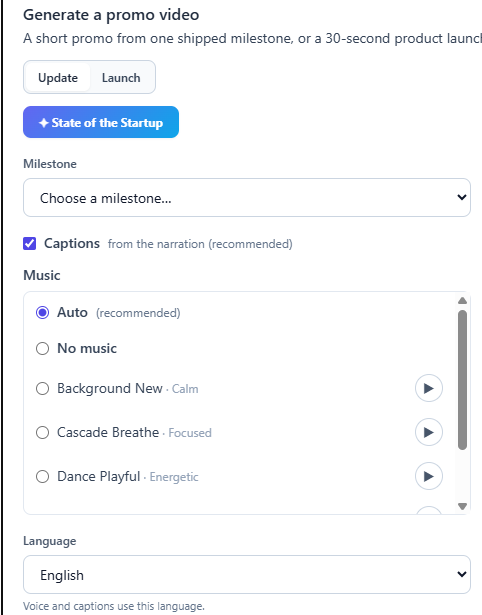
A launch announcement without a visual gets scrolled past before anyone reads the hook. FoxPlug's Image Studio builds the hero graphic that anchors both the social post and the blog announcement, and the same Studios can spin up a GIF version on request for the platforms where a short loop beats a static image. If the release is substantial enough to walk through, the Walkthrough Recorder captures a narrated tour in roughly two minutes, and Launch Video Generation can auto-produce a 30-second video plus a GIF and stickers straight from the release — so the announcement has motion to point to instead of a single flat screenshot.
Step 4 — Embed proof with a Comparison Card or ROI Snapshot
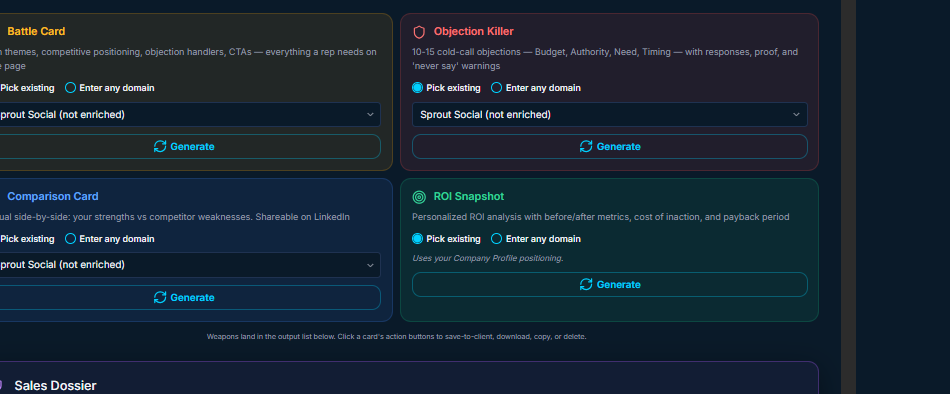
A hook and a hero image get someone to stop scrolling. What gets them to sign up is proof — a reason to believe the outcome you're claiming is real and not marketing copy. Pull a Comparison Card or ROI Snapshot from MentionFox's Sales Arsenal and drop it into the announcement as the third beat, right after the hook and before the CTA. The Comparison Card is built to be LinkedIn-shareable on its own, which means it can outlive the original post — someone can reshare just the card without needing the surrounding announcement for context. The ROI Snapshot does the same job with numbers instead of a side-by-side: a compact "what you save" block that answers the skeptical reader's actual question before they have to ask it.
Both are sourced, verified proof blocks, not a superlative pasted into the copy — every figure on the card traces back to something you can stand behind, which matters more in a launch post than almost anywhere else, because launch posts are exactly the content people are most primed to distrust.
Step 5 — Publish as a shareable artifact others can amplify
Once the announcement is written, imaged, and backed with proof, the last step is making it something other people can pick up and spread without you having to re-explain it every time. MentionFox's Founder Den turns the announcement into a shareable artifact — a link you can hand to early users, advisors, or your own network that carries the hook, the proof, and the CTA together, built for the Den's Engagement HQ rather than for a single platform's post format. The Den is also where you schedule the launch date itself, so the announcement, the Den artifact, and any grant or accelerator application drawing on the same launch narrative — the Den lists 22 non-dilutive programs you can apply to — all point back to the same story instead of three inconsistent versions of it.
Fixes for an announcement that isn't converting
If you've followed the build order above and signups are still flat, work down this list before you touch the copy again:
- The hook doesn't survive being read alone. Copy just your Short Post draft into a blank note with no other context. If it doesn't make sense on its own, rebuild it in Short Post before touching anything downstream — everything else in the funnel inherits the hook's clarity or its confusion.
- There's no proof block. An announcement with a claim but no Comparison Card or ROI Snapshot is asking the reader to take the claim on faith. Add the proof beat between the hook and the CTA rather than burying it in a footnote at the bottom.
- The visual is a screenshot, not a story. A raw screenshot shows a feature; an Image Studio hero graphic or a short GIF shows an outcome. If the graphic needs a caption to make sense, it isn't doing its job yet.
- The announcement only exists in one place. A single post with no Longform companion and no Founder Den artifact has nowhere to send someone who wants the full story or wants to share it onward. Publish all three from the same release so a reader who lands on any one of them gets the complete picture.
- Nobody outside your own account is amplifying it. If the announcement only exists as a post on your own timeline, it depends entirely on your existing reach. A Founder Den shareable artifact removes that ceiling — it's built to be handed off, not just posted.
Draft the proof block in MentionFox Sales Arsenal, then build and publish the announcement itself in FoxPlug — the two together cover the full build order above, from the first line of the hook to the artifact someone else shares on your behalf.
---
Frequently asked questions
What’s the single most important metric to track in a launch announcement?
The conversion rate from announcement reader to signup. If your announcement passes the five-second scan test but still fails to convert, the problem is usually a weak or buried CTA. Koder.ai recommends placing one primary CTA above the fold and repeating it consistently.
How many emails should a launch sequence include?
Userpilot’s review of 25 real product launch emails found that the most effective campaigns send a sequence — typically a teaser, an announcement, a tour, and a feedback email. A single blast rarely drives signups because most people need to see the message multiple times before acting.
Should I use a press release or a blog post for my launch?
Both serve different purposes. Airfoil Group notes that the primary audience for a press release is journalists, not end users. Use a press release to secure media coverage and build trust, and pair it with a blog post or email for your existing subscribers. The press release informs the press; the blog post converts readers.
---
Last updated 2026-07-20.
Quick check: are AI assistants likely to recommend you?
Tick what is true for your brand. The score is a rough read on your AI-recommendation readiness.
Score: 0 / 10 — tick the boxes above.
MentionFox — Evidence-backed sales intelligence and due diligence engine.
Research a person, investor, founder, or firm before the meeting: verified public-record evidence, a one-page dossier, and every claim cited.
Try MentionFox free →Sources & evidence
Every claim is traceable to a dated source. Verified July 20, 2026.
- Signal Genesys - New Business Launch Press Release: Examples, Templates, and Writing Guide — Provides the case study statistic “2000% Increase in Returns” and supports the claim that “a well-crafted new business press release provides journalists with factual information, generates interest among potential investors, and drives early engagement with customers.”
- Brett Miller, MBA - How to Write a Proper Launch Announcement (LinkedIn) — Source for the 30% reduction statistic, the five-part launch structure, the quote “A launch without adoption is just a status update,” and the mention of “10+ launches I led at Amazon.”
- Koder.ai - Create a Website for Product Launch Announcements Guide — Provides the “under 5 seconds” hero test, the “Set up in 10 minutes” headline example, the “save 2–3 hours a week” benefit claim, and the advice to use 3–5 key benefits. Also advises to avoid slogan headlines.
- FluentCRM - The Modern Website Launch Announcement Checklist for Founders — Supports the importance of “
Frequently asked
What’s the single most important metric to track in a launch announcement?
How many emails should a launch sequence include?
Should I use a press release or a blog post for my launch?
Cite this guide
Referencing this paper? Copy the citation below. Every claim here is sourced, so it holds up.
Referenced this in your writing? Get featured →
Add the link to your piece. We verify that your page links back here, then queue it for review — no account needed. Approved reports appear in the Featured Field Reports on the matching hub.